Glideep
 Glide
Glide Bubble
 Shopify
 Lovable
 Base44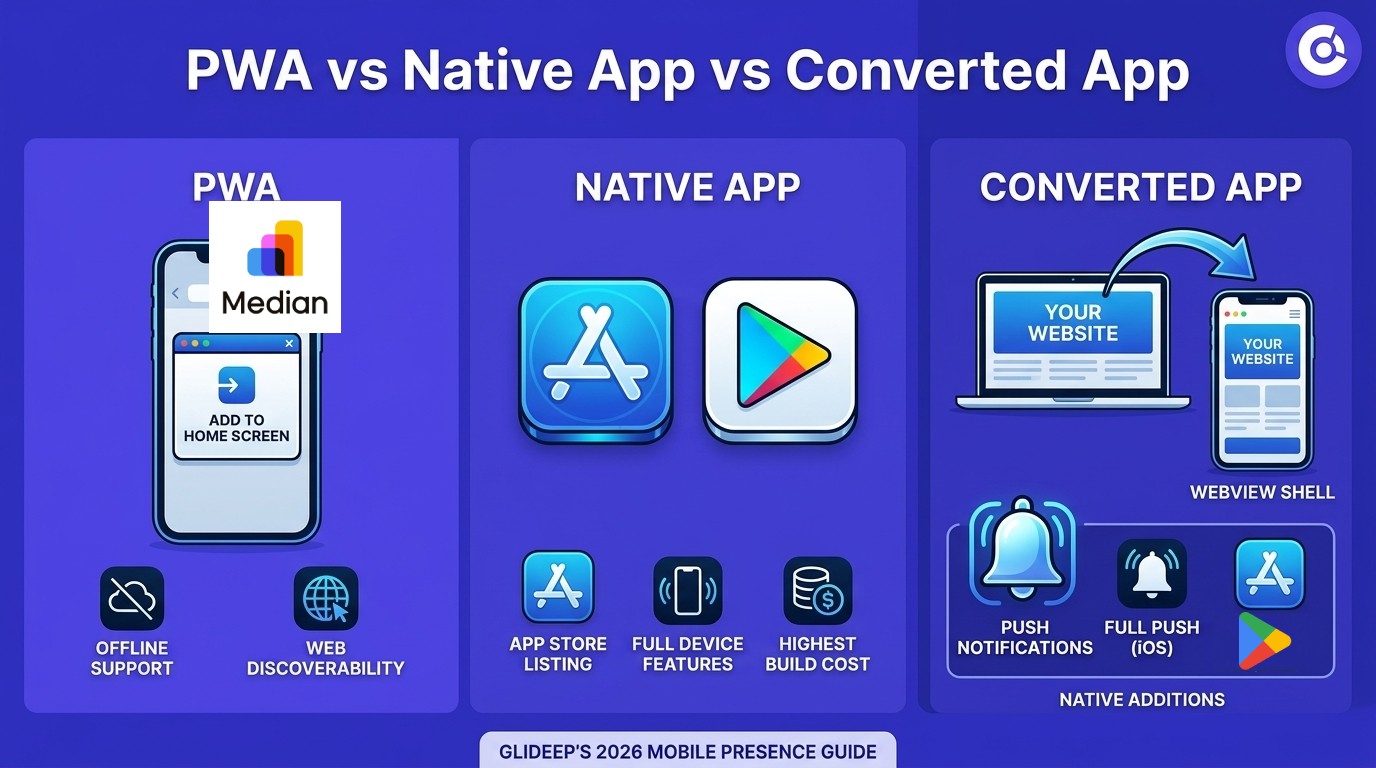
If you want a mobile presence, you'll hit a fork in the road: build a Progressive Web App (PWA), build a native app, or convert your website into a native app. They sound similar but behave very differently in the places that matter — the app stores, push notifications, and discoverability. Here's how to choose in 2026.
What is a PWA?
A Progressive Web App is a website enhanced with offline support and an "Add to Home Screen" prompt. It runs in the browser, needs no app store, and works across devices from one codebase. The catch: PWAs have limited access to native features, weak install prompts, and — critically — they are not listed in the App Store or Google Play, where most users actually look for apps.
What is a native app?
A native app is built specifically for iOS or Android using their official languages. It has full access to every device capability and the best possible performance — but it's the most expensive and slowest to build, and you maintain separate codebases for each platform.
Where converted (WebView) apps fit
A converted app is the middle path: your website wrapped in a native shell. It gets a real App Store and Google Play listing, native push notifications, biometric login, and offline cache — but you maintain just one codebase (your site). For most businesses this captures the benefits of "native" without the cost. Learn more about how it works in our guide to turning a website into an app.
PWA vs native vs converted app
FeaturePWANativeConverted app App Store listingNoYesYes Push notifications (iOS)LimitedFullFull Offline supportBasicFullFull Build costLowVery highLow Codebases to maintain121 What about SEO and discoverability?
This is where many people get confused. Your website is what ranks in Google — and a converted app keeps that website fully intact, so your SEO is unaffected. On top of that, an App Store and Google Play listing adds a second discovery channel (app store search, or ASO) that a PWA simply doesn't have. You get web discoverability and app-store discoverability at once.
Which should you choose?
Choose a PWA if you want the absolute cheapest option and don't need store listings or strong iOS push. Choose fully native if you're building a complex, hardware-heavy product with a real engineering budget. Choose a converted app if you already have a website and want store listings, push, and a native feel without rebuilding anything — see the tools that do it.
When each option makes sense
A quick gut-check based on what you're building:
- Choose a PWA if you're an early-stage project, budget is near zero, and you mainly care about a fast mobile web experience rather than store presence.
- Choose fully native if you're building a flagship product with heavy device features (AR, advanced camera work, real-time gaming) and have engineers to maintain two codebases.
- Choose a converted app if you already have a website — a store, a content site, a SaaS dashboard, a community — and want store listings, push, and a native feel without a rebuild.
The majority of businesses fall into that last bucket, which is why converted apps have become the default starting point.
Do app stores accept converted apps?
Yes — provided the app adds real native value. A bare wrapper around a website can be rejected (Apple's guideline 4.2), but a converted app with push notifications, offline support, and a genuine native experience passes review just like any other app. PWAs sidestep this only because they're not in the stores at all — which is also their biggest limitation. For the full walkthrough, see our guide to turning a website into an app.
FAQ
Are PWAs dead in 2026?
No, but their limits on iOS (especially push and install prompts) and the lack of store listings push most businesses toward a converted native app.
Do converted apps hurt my SEO?
No. Your website is untouched and continues to rank normally; the app is an additional channel, not a replacement.
Can I have both a PWA and a native app?
Yes. Many businesses keep a PWA for mobile web and ship a converted native app for the stores and push — both run off the same website.
Ready to build your app?
Turn your website into a native iOS & Android app in minutes — no code, no Mac needed.
Start for free →